How AI Purchase Invoice Processing Reduces Manual AP Data Entry
- How AI Purchase Invoice Processing Reduces Manual AP Data Entry
- Every Supplier Invoice Should Not Start With Typing
- Manual Invoice Entry Creates More Work Than It Appears To
- AI Can Read an Invoice. GoldFinch Creates a Better Starting Point.
- The Initial GoldFinch Workflow
- What Changes for the AP Team?
- Start With Invoice Intake and Data Entry
- A Practical Example
- Better Starting Points, Not Less Control
- Frequently Asked Questions
- Introduction
- The Business Problem
- Why AI Is Finally Ready for This Job
- AI Without ERP Validation Is Only Half the Solution
- How GoldFinch Puts This Together
- When Validation Finds a Problem
- What Changes for Your AP Team
- Real-World Example
- Best Practices for Getting There
- Frequently Asked Questions
- Conclusion
Every Supplier Invoice Should Not Start With Typing
For many Accounts Payable teams, invoice processing still begins the same way: a supplier emails a PDF, someone downloads it, opens it, and starts typing.
Vendor name. Invoice number. Invoice date. Due date. Purchase Order number. Item lines. Quantities. Unit costs. Taxes. Payment terms.
Then comes the checking. Is this the right vendor? Has the invoice already been entered? Is there a related PO? Does it need additional review before posting?
None of this work is unusual. But when it happens hundreds of times a month, AP staff can spend a substantial part of their day moving information from supplier documents into the ERP before they can begin the work that actually requires judgment.
The problem is not simply time. Every manually rekeyed field creates another opportunity for a typo, delay, duplicate, or missed discrepancy.
For manufacturers, distributors, food banks, and nonprofit meal programs, a supplier invoice is often connected to purchasing, receiving, inventory, and accounting activity—not simply a general ledger expense. Manual entry can slow down the entire process.
AI purchase invoice processing changes where AP starts. Instead of beginning with a blank Purchase Invoice, the AP team can begin with a completed draft that is ready for review.
Manual Invoice Entry Creates More Work Than It Appears To
Entering an invoice may take only a few minutes, but the full process often includes more:
- Downloading, organizing, and attaching supplier documents
- Identifying the correct vendor record
- Entering header and line-level invoice details
- Locating a related Purchase Order
- Checking for possible duplicates
- Reviewing supporting purchasing or receiving information when applicable
- Preparing the transaction for approval, review, and posting
When this work is repeated invoice after invoice, AP professionals can spend more time on transcription and record lookup than on exceptions, vendor questions, payment priorities, and month-end responsibilities.
The goal of automation should not be to remove people from AP. It should be to remove repetitive document-entry work so people can focus on the decisions that deserve their attention.
AI Can Read an Invoice. GoldFinch Creates a Better Starting Point.
Traditional OCR can recognize text on a document. AI can extract that information into structured fields. Depending on the supplier invoice and configured template, that can include vendor name, invoice number, dates, currency, payment terms, PO number, item details, quantities, Units of Measure, costs, taxes, and totals.
That is useful—but reading an invoice is only the beginning. An extracted value tells AP what the supplier document says. It does not, by itself, determine whether the transaction is ready to become an accounting record.
Reading isn’t the hard part. Trusting it is.
Extraction gets the data out of the document. Validation is what turns that data into something your accounting system can trust.
GoldFinch combines AI extraction with the ERP records AP already relies on. It can validate applicable, available information against records such as vendors, Purchase Orders, warehouse receipts, items, Units of Measure, currency, duplicate-invoice information, and configured business requirements.
The outcome is not an invoice that posts itself. It is a more complete draft Purchase Invoice for a user to review and post.
For a deeper explanation of why extraction and validation are different, see Why Invoice Extraction Isn’t Enough: The Importance of ERP Validation.
The Initial GoldFinch Workflow

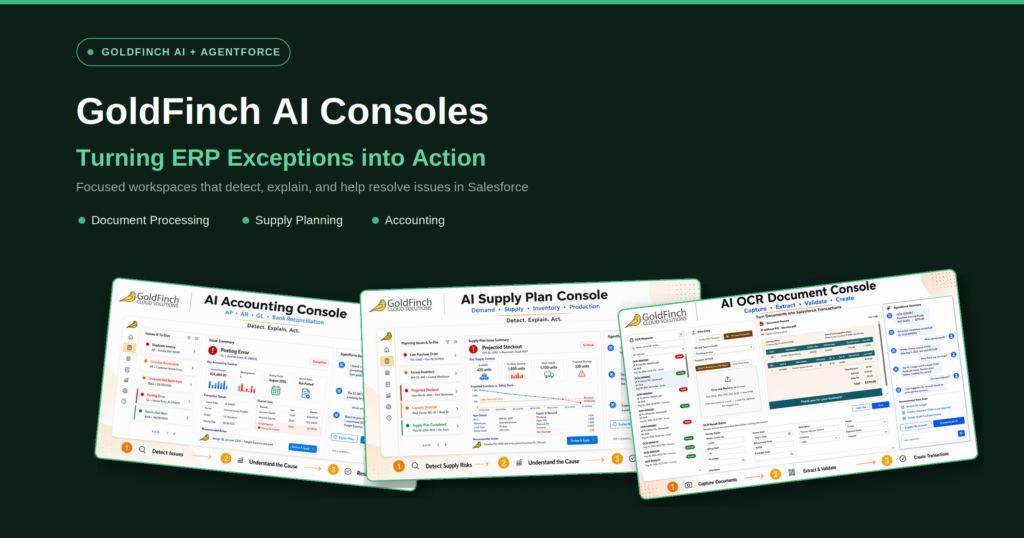
A supplier invoice can enter through an AP email workflow or be uploaded by a user. GoldFinch creates an OCR Request and sends the document to the configured AI provider for extraction. The extracted data is mapped through GoldFinch OCR templates and used to create a draft Purchase Invoice after applicable validation steps have been performed.
The AP user remains in control of the accounting transaction: review the draft, investigate issues that need attention, make corrections when appropriate, and post the invoice when it is ready.
That creates a better starting point for AP. The user does not need to begin every routine invoice by retyping supplier-document information into a blank screen.
What Changes for the AP Team?
With manual processing, the routine often looks like this: open invoice → type invoice → locate records → check details → create invoice → repeat.
With AI purchase invoice processing, work shifts toward reviewing completed drafts and resolving the invoices that genuinely need attention. AP can focus more time on investigating discrepancies, resolving vendor questions, coordinating with purchasing or receiving, reviewing approval and posting decisions, and supporting cash management and month-end close.
This is not “fully automated AP.” It is a practical model: use AI for repetitive extraction, use ERP records to provide context, and keep trained users responsible for review and posting.
Start With Invoice Intake and Data Entry
Consider a distributor that receives recurring invoices for packaging materials. Before automation, an AP employee opens each PDF, identifies the vendor, enters the invoice number and dates, types the PO number and line details, attaches the document, and then begins the review process.
With GoldFinch AI OCR, the supplier can continue sending invoices through the normal AP intake process. GoldFinch extracts supplier-document information and creates a more complete starting point for the AP team. If the invoice has a related PO, GoldFinch can use relevant ERP records to help validate the transaction before the draft Purchase Invoice is reviewed.
If information is missing, does not align with available ERP records, or appears to be a possible duplicate, the AP team can investigate before posting. If the invoice is routine and the available information supports it, the user can focus on reviewing the completed draft rather than rekeying the document from scratch.
A Practical Example
Purchase invoice processing is often a practical first step in AP automation because it addresses a high-volume, repetitive task while preserving financial control.
A sensible rollout can begin with:
- Establishing a consistent AP invoice intake process
- Configuring the fields to extract from supplier invoices
- Creating review-ready draft Purchase Invoices
- Defining how AP users review and post invoices
- Refining validation and exception processes as AP, purchasing, and receiving teams use the workflow
Not every invoice follows the same path. PO-related invoices may require additional purchasing and receiving checks, while non-PO invoices may follow a different review process. The point is to create a controlled workflow that fits the organization’s real operations.
Better Starting Points, Not Less Control
AI is valuable because it can reduce repetitive work involved in reading supplier documents and entering data. But the value is not simply faster typing. It comes from giving AP a more complete, organized starting point inside the ERP—one that can be reviewed in the context of the business records that matter.
GoldFinch helps organizations receive supplier invoices, extract key information, validate applicable ERP data, and create draft Purchase Invoices for user review and posting. That helps AP teams spend less time typing and more time on the work that requires experience and judgment.
Related reading:
Why Invoice Extraction Isn’t Enough
How Three-Way Matching Works
What Happens When AI Gets an Invoice Wrong
Ready to reduce manual invoice entry in your AP process? Request a demo to see how GoldFinch turns supplier invoices into review-ready Purchase Invoice drafts inside Salesforce.