What Happens When AI Gets an Invoice Wrong?
Exceptions Will Happen. The Question Is How You Handle Them.
Supplier documents can be incomplete. Purchase Orders can change. Warehouse receipts can be delayed. Vendors can submit the same invoice more than once. AI can occasionally misread a field. Employees can enter incorrect information.
The question is not whether an exception will occur. The question is whether it becomes visible before it becomes a posted accounting transaction or moves toward payment.
That is what controlled AP automation should accomplish.
GoldFinch does not assume AI extraction is always correct, and it does not position AI as replacing AP judgment. GoldFinch uses ERP validation to identify conditions that need attention, then gives the user an opportunity to investigate, correct information when appropriate, and proceed through the normal Purchase Invoice process.
Not Every Exception Is an AI Error
Suppose a supplier invoice says 1,000 cases were billed. AI extracts the quantity as 1,000 correctly. GoldFinch checks related receiving information and shows that only 800 cases have been recorded as received.
The AI may have read the invoice perfectly. The supplier may even have invoiced correctly based on a shipment that is still in transit. But the supplier document and the ERP record do not yet agree.
That is a business exception.
The same principle applies when a vendor record cannot be located, a referenced PO is not found, a warehouse receipt is missing, an invoice quantity exceeds recorded receiving, an item or Unit of Measure is unexpected, an invoice appears to be a duplicate, or required information is missing.
An exception does not automatically tell AP what the answer should be. It tells AP that the transaction needs a decision.
Four Types of Exceptions Need Different Responses
1. Extraction corrections
The supplier document is clear, but a field was extracted incorrectly. A user can correct the OCR result in the OCR Result Editor and run the Purchase Invoice creation process again.
2. ERP-data or process issues
The extraction is correct, but the vendor record, PO, item setup, Unit of Measure, or receiving record is incomplete or incorrect. The underlying ERP data or operational process needs attention.
3. Supplier or commercial issues
The invoice may be incorrect, submitted before the warehouse receipt, or require a credit, corrected invoice, or vendor clarification. AP should not use automation as a reason to bypass normal vendor-resolution practices.
4. Legitimate business decisions
Not every mismatch is a problem. A partial shipment may be in transit, a non-PO invoice may be valid, or an authorized exception may be allowed under company policy. The purpose of the workflow is to make the condition visible so the appropriate person can decide how to proceed.
Four types of exceptions, four different responses
Not every mismatch means AI made a mistake
The document is clear, but a field was read incorrectly.
Next step: user corrects the field in the OCR Result Editor, then reruns invoice creation.
Extraction is correct, but the vendor record, PO, item, UOM, or receipt is incomplete.
Next step: user corrects the underlying ERP data or process.
The invoice may be wrong, submitted before the warehouse receipt, or need a credit or vendor clarification.
Next step: normal vendor-resolution practices apply; automation doesn’t bypass them.
Not every mismatch is a problem — a partial shipment or authorized exception, for example.
Next step: nothing to correct; it’s surfaced so the right person can decide.
The Exception Workflow: Identify, Investigate, Resolve, Review
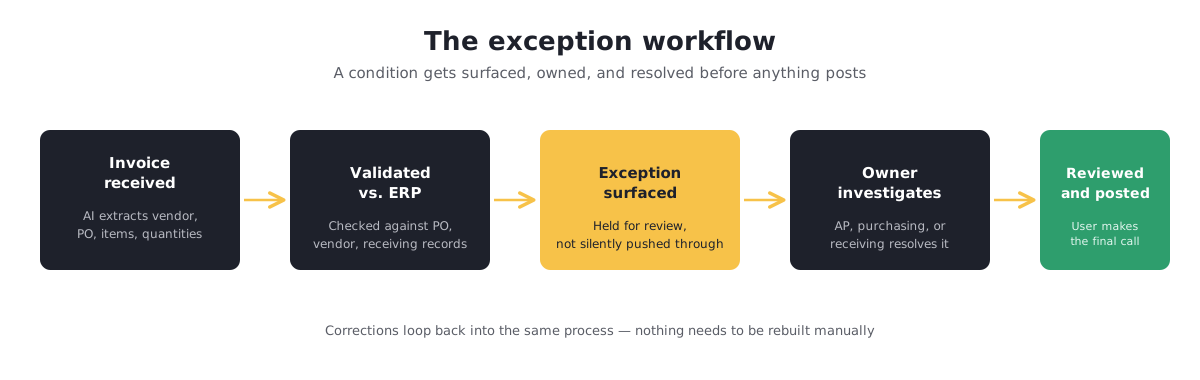
Invoice received → AI extracts invoice information → GoldFinch validates available ERP information → exception is surfaced for review → appropriate team investigates and resolves the issue → user reviews the draft Purchase Invoice and posts when appropriate.
If the extracted information is incorrect, the user can correct the result and rerun the Purchase Invoice creation process. If the extraction is correct but business records do not agree, the appropriate team can investigate the underlying issue first.
The user does not need to abandon automation and rebuild the invoice manually simply because one field or business condition needs attention.
Give Each Exception a Clear Owner
Many AP exceptions are not AP-only problems.
- Vendor not found: AP or vendor-master-data owner determines whether the vendor should be matched, created, or corrected.
- PO not found: Purchasing or AP determines whether the supplier referenced the wrong PO or the invoice is a legitimate non-PO invoice.
- Missing receipt: Receiving or warehouse team determines whether goods were received but not entered, or delivery has not occurred.
- Quantity discrepancy: Receiving, purchasing, and AP determine whether there is a partial shipment, receiving delay, supplier error, or PO change.
- Item or UOM difference: Inventory, purchasing, or AP determines whether an alias, conversion, master-data correction, or supplier correction is needed.
- Duplicate invoice: AP determines whether it is a true duplicate, a credit/rebill, or a separate legitimate invoice.
- Missing required information: AP determines whether the data can be corrected internally or whether the supplier must clarify it.
Clear ownership turns an exception from an email chase into an actionable business task.
Give each exception a clear owner
Most AP exceptions aren’t AP-only problems
| Exception type | Who decides |
|---|---|
| Vendor not found | AP or vendor-master-data owner — match, create, or correct the vendor |
| PO not found | Purchasing or AP — wrong PO referenced, or a legitimate non-PO invoice |
| Missing receipt | Receiving or warehouse team — received but not entered, or not yet delivered |
| Quantity discrepancy | Receiving, purchasing, and AP — partial shipment, delay, supplier error, or PO change |
| Item or UOM difference | Inventory, purchasing, or AP — alias, conversion, or master-data correction |
| Duplicate invoice | AP — true duplicate, credit/rebill, or a separate legitimate invoice |
| Missing required info | AP — correct internally, or ask the supplier |
Human Review Is a Feature, Not a Failure
A clean transaction may need only a focused review before posting. An invoice with a genuine discrepancy deserves human judgment.
The system handles repetitive document work in both cases. The difference is where people spend time. Instead of typing and checking every invoice manually, AP can concentrate on the invoices where judgment is actually required.
Do Not Train Users to Override Warnings
An exception is useful precisely because it identifies a condition that does not make sense yet. If users are trained to click past warnings simply to keep invoices moving, the organization loses much of the control automation was intended to strengthen.
Define how exceptions should be handled: which conditions stop normal processing, who owns each type of discrepancy, what evidence is required before an invoice proceeds, when ERP records should be corrected, and when AP should request a corrected supplier invoice.
Controlled Automation Is the Goal
The value of AI invoice processing is not that it never needs correction. The value is that it can reduce repetitive document work, identify transactions that need attention, and keep users in control before a Purchase Invoice is posted.
Related reading:
Why Invoice Extraction Isn’t Enough
How Three-Way Matching Works
From Supplier Invoice to Vendor Payment
See how GoldFinch can validate PO-related invoices against purchasing and receiving records before they are posted.