
Everything You Liked About NAV. None of the Add-Ons Business Central Needs.
Our team has worked with Microsoft Dynamics NAV for many years, and GoldFinch’s data structure will feel familiar. Manufacturing, warehouse, traceability, and accounting ship complete, on the Salesforce platform. No Salesforce yet? GoldFinch includes the platform license.
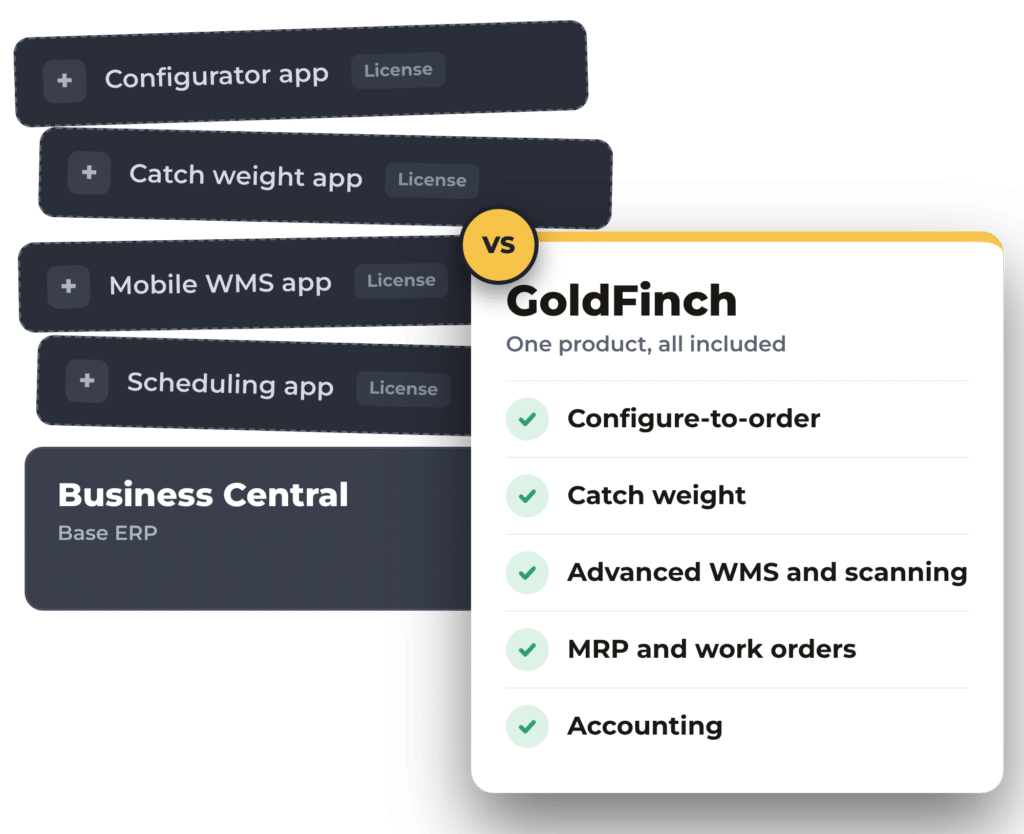
Business Central looks complete on a feature list. Most manufacturers find out otherwise.
Out of the box, its manufacturing, warehouse, traceability, and quote-to-production capabilities are shallow, so a typical project adds third-party apps and AL extensions. Each one is another vendor, another license, and another thing to retest with every update.
Built by NAV veterans
GoldFinch’s data structure is very similar to NAV’s. Items, journals, and posted entries work the way NAV users expect from day one.
Complete out of the box
Manufacturing, WMS, lot and serial, catch weight, the GoldFinch Product Configurator, and accounting, from one vendor in one product.
A more modern platform
Metadata-driven upgrades, built-in automation tools, and Salesforce’s AI strategy. The Salesforce platform license is included.
GoldFinch vs Business Central, plus what it takes to match.
← Swipe to compare →
| Area | GoldFinch (included) | Business Central out of the box | What BC customers typically add |
|---|---|---|---|
| Manufacturing | Native MRP, BOMs, work orders, Production Item Journal | Basic production orders and MRP, Premium license only | +Shop floor, scheduling, or process manufacturing apps |
| Warehouse | Multi-warehouse and bins; advanced WMS and barcode scanning in Professional | Basic warehouse functions | +Advanced mobile WMS and scanning apps |
| Lot, serial, catch weight | Lot and serial in every edition; catch weight with per-case serial and actual weight | Lot and serial | +Catch weight and food-industry apps |
| Quote to production | Configured quote flows to BOM and work order | No product configurator | +Configurator apps or custom AL code |
| Inventory costing | Real-time FIFO, plus consumption by specific lot or serial | Costing methods per item | Nothing extra |
| Accounting | GL, AR, AP, fixed assets, project billing; GL drill-down; P&L without closing the period | Strong core financials | Nothing extra |
| CRM | Native Salesforce, one data model | Basic built-in CRM | +Salesforce connector or middleware |
| Customer/partner portal | GoldFinch add-on | None built in | +Portal apps or custom builds |
| Data structure | Familiar to NAV users, built by NAV veterans | NAV codebase | Nothing extra |
| Customization | Salesforce low-code configuration | AL extensions by a partner | +Retesting add-ons and extensions with each update |
| Upgrades | Metadata-driven; upgrades arrive seamlessly with your configuration intact | Two major updates a year | +Retest every add-on and AL extension |
| Automation | Salesforce automation tools for approvals, alerts, and workflows, included | Basic workflows and approvals | +Power Automate flows or custom code |
| AI | Salesforce AI platform: Agentforce, Headless 360, and Claude inside the Salesforce trust boundary | Copilot included in full licenses | Nothing extra |
| Licensing | Three editions; Salesforce platform license embedded, so no separate Salesforce licenses to buy | Essentials $80, Premium $110 per user/month | +Each add-on licensed separately |
Business Central pricing is Microsoft US list price, per user per month, billed annually, as of November 2026.
Outgrowing Business Central?
In the Microsoft family, deep manufacturing means stepping up to Dynamics 365 Supply Chain Management, the enterprise ERP that grew out of Axapta. That’s a different product and a full re-implementation. GoldFinch gives mid-market manufacturers that depth without the enterprise price or project.
Why companies choose GoldFinch over Business Central
Less customization, lower risk
Projects configure instead of code, using Salesforce low-code tools rather than partner-built AL extensions.
Manufacturing that goes deep
Native MRP, work orders, BOMs, and the Production Item Journal in GoldFinch Professional, our most popular edition.
Traceability for regulated products
Lot and serial in every edition, and catch weight, with each case carrying its own serial number and actual weight.
Ready for CRM when you are
Already on Salesforce? No connector. Not yet? Adding Salesforce CRM later is a native step, not an integration project.
AI-ready by design
Salesforce Headless 360 opens the platform to AI agents, and Claude runs in Agentforce inside the Salesforce trust boundary.
Industry experts, not generalists
Decades in manufacturing, distribution, and food & beverage, working with customers continuously to improve the product.
When Business Central may be the better fit
- You want everything inside the Microsoft ecosystem, including Dynamics 365 Sales.
- You need the broadest add-on marketplace for niche industry needs on Microsoft AppSource.
- Your NAV system is lightly customized and you want the shortest technical path.
- You don’t make, store, or ship products. Compare GoldFinch Accounting on its own instead.
Your support clock is running
Jan 11, 2028
NAV 2018 extended support ends
Dec 31, 2029
Dynamics GP support and tax updates end
Moving from GP to Business Central is a new implementation anyway, so it’s the right moment to compare.
Moving to GoldFinch
Assessment
Map modules, add-ons, customizations, and integrations.
Data migration plan
Balances, masters, open orders, and how much history to carry.
Operational Foundation
Configure ERP and Accounting, migrate, train, go live.
Retire the integration layer
Shut off any ERP-to-CRM connector.
Hypercare and growth
Add advanced WMS, supply planning, portals, or AI agents.
Frequently asked questions.
Evaluating Business Central? See GoldFinch first.
We’ll walk through your own quote-to-cash flow, from opportunity to work order, shipment, and ledger, in one system.
No obligation. Speak directly with an experienced ERP and accounting professional.